Tiling Mode
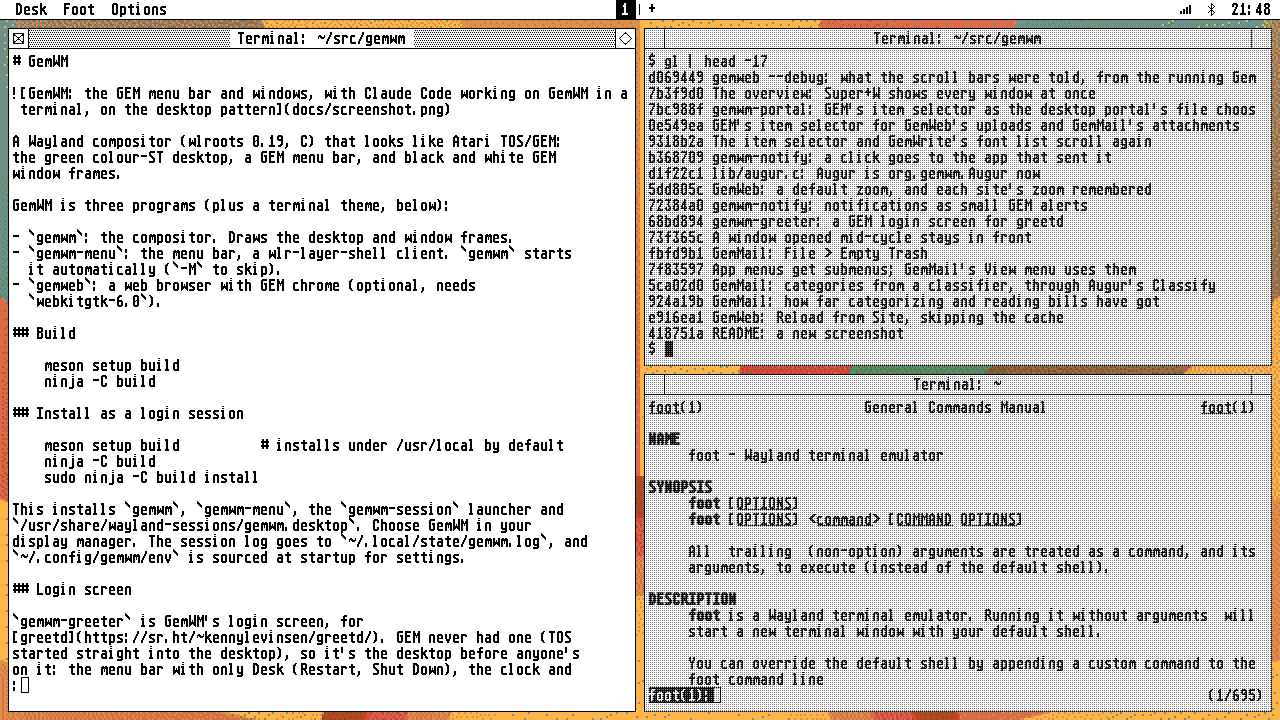
In tiling mode, windows share the screen in two columns, each stacking its
windows top to bottom, gap pixels apart. Dialogs float on top. Switch to it
in Options > Mode, or with gemwm msg mode tiling.
Where windows go
A new window opens where you’re working, as in i3 and sway: the second window starts the right column, and after that a new window splits the focused window’s column, just below it. A column left empty gives the other the whole width.
Keys
| Keys | Does |
|---|---|
| Super+Arrows | focus the tile that way |
| Super+Ctrl+Arrows | swap the focused window with its neighbour that way |
| Super+Shift+Left/Right | push it into the other column, below the window beside it |
| Super+Z | make the focused tile fill the screen, and back |
Pushing only works if the window’s own column keeps another; from a single column, it starts a second.
Super+Z (or a tile’s fuller) makes the focused tile fill the screen; the other tiles stay open but hidden until Super+Z again, a new window, or moving focus brings the layout back.
Focus
Tiles show the pink focus border while Super is held, as in window mode, and the others are greyed out with GEM’s dotted “disabled” pattern (clicks go straight through it). To keep the border on the focused tile all the time:
[highlight]
tiling = always
dim = tiling              # always, or off
Layout
[layout]
mode = tiling             # the mode GemWM starts in
gap = 8                   # pixels between tiles
Tiles can’t be dragged or resized. Switching back to window mode returns every window to where it was.
Changes to the layout are animated, gliding by default or in GEM’s outlines: see animation.