Login Screen
gemwm-greeter is GemWM’s login screen, for
greetd. GEM never had one (TOS started
straight into the desktop), so it’s the desktop before anyone’s on it: the
menu bar with only Desk (Restart, Shut Down), the clock and battery, and the
people who can log in as icons on the desktop, as the ST showed its disk
drives.
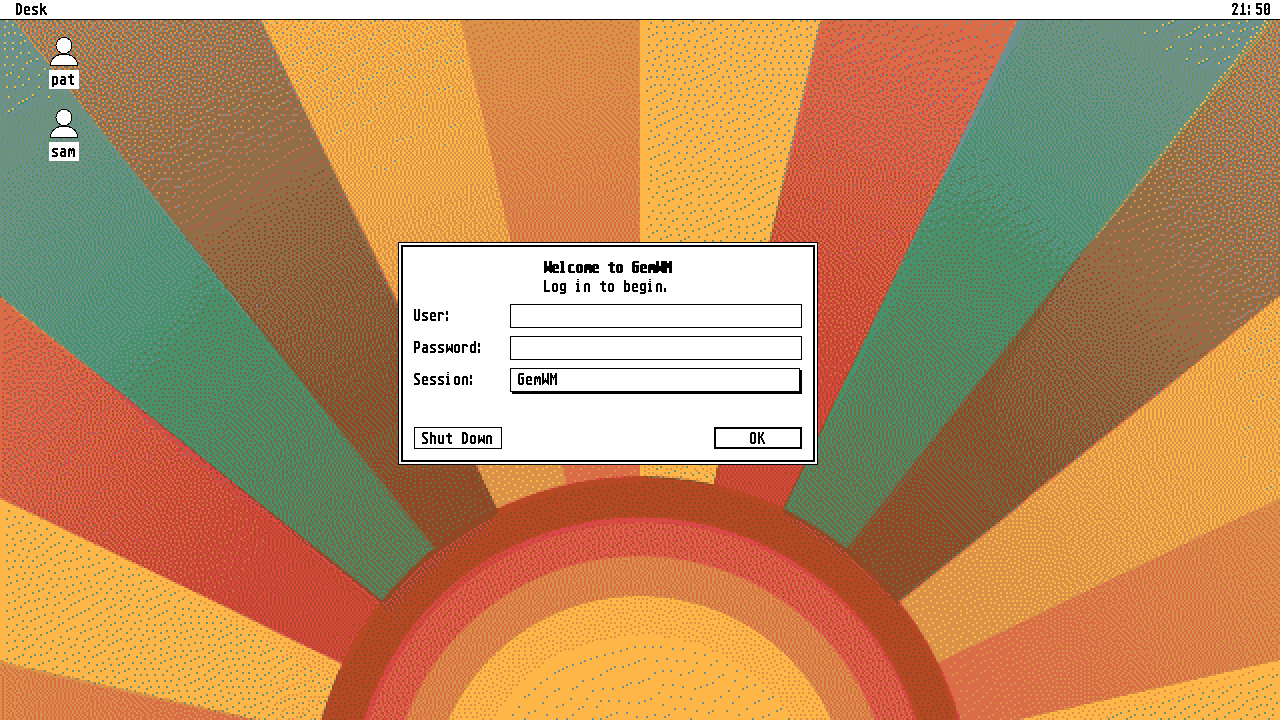
Click one, or type a name, and a GEM dialog asks for the password and which
session to start (from /usr/share/wayland-sessions). A wrong password is a
GEM alert; anything more PAM asks (a code from a key, say) is asked in the
same dialog. It remembers who logged in last, and with what.
Setting it up
greetd does the logging in; the greeter runs inside GemWM’s greeter mode,
gemwm -G, which runs no key bindings and quits when the greeter does. In
/etc/greetd/config.toml:
[default_session]
command = "/usr/local/bin/gemwm -G /usr/local/bin/gemwm-greeter"
user = "greeter"
Then make the directory it remembers in (or reboot), and restart greetd. Do this from a text console, or it ends your session:
sudo systemd-tmpfiles --create
sudo systemctl restart greetd
Its desktop
The desktop it shows is set in /etc/gemwm/greeter.conf, a [desktop]
section as in your own config. A picture has to be
somewhere the greeter user can read, not your home:
[desktop]
image = /usr/local/share/backgrounds/atari-wall.jpg
dither = st16