Notifications
Notifications as GEM alert boxes, with a history, Do Not Disturb, and a bell only while there's something new.
gemwm-notify
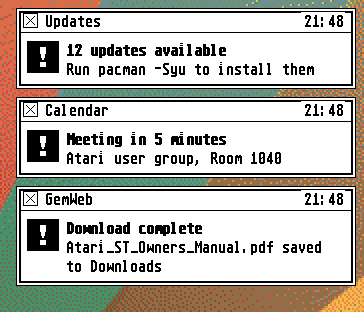
GEM had no notifications, but it had form_alert, so gemwm-notify shows each
notification as a small alert box that doesn’t wait for you, under the menu
bar at the right. It has a close box, the app’s name and the time, the note
icon (stop, for critical ones), and its actions as buttons.
Click the body for the app’s default action, which usually brings its window forward and opens what the notification’s about; for one with no default action, the app’s window is brought forward instead. Up to three show at once, newest at the top; each goes after five seconds (or as long as the app asks), but waits while the pointer’s over it, and critical ones stay until you close them.
The bell and the history
A bell in the menu bar, with a count, shows only while there are notifications you haven’t seen: one you closed or clicked is seen, one that just timed out isn’t. Click it, or choose Desk > Tools > Notifications, for the history (the last 200), which marks them all seen; File > Clear All empties it.
Options > Do Not Disturb keeps everything but critical notifications from popping up: they go quietly into the history, and the bell shows they came.
Setting up
D-Bus starts it the first time a program sends a notification, so no other
notification daemon should be installed. With mako, say:
sudo pacman -R mako, and log in again.