GemPod
Podcasts, synced with your phone through a gpodder sync server: where you got to, everywhere.
gempod
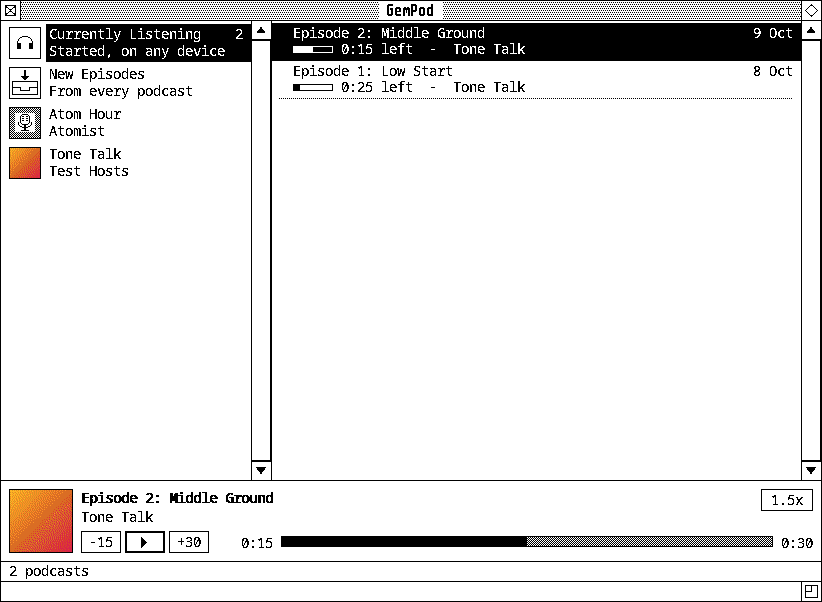
GemPod (Desk > Office) is for podcasts. The podcasts are down the left, each with its artwork in the ST’s colours. At the top, Currently Listening has every episode you’ve started and not finished, here or on your phone (as synced), the one you listened to last first; GemPod opens on it when there’s anything there. Under it, New Episodes has every podcast’s fresh ones. The one picked’s episodes are on the right, each with how long it is, how much is left, or Played. What’s playing is along the bottom: back 15 seconds, play, on 30, a bar to go anywhere in it, and the speed, from 0.8x to 2x, faster or slower without changing the voice.
gempod                  # your podcasts
gempod FEED-URL         # subscribed to, and shown
Syncing with your phone
GemPod syncs with a gpodder sync server: gpodder.net, or your own, like barking, opodsync or mygpo. It’s the same API AntennaPod and Kasts use, so your phone and GemPod share one list of podcasts, and where you got to in every episode.
File > Sync Settings takes the server, your username and password, and a name for this computer there. Sign In checks them before anything’s kept. From then on GemPod sends what you play, finish, mark played or unplayed, download and delete, and takes your other devices’ where they’re newer. A place from your phone in an episode GemPod hasn’t read yet is kept until it has.
It syncs a little after you change something, every fifteen minutes, and when
you ask (File > Sync Now, ^S). The first time, its podcasts and the
server’s are put together, not replaced. The password goes to your keyring
(the Secret Service) if there is one, else in ~/.config/gempod/settings,
readable only by you.
Its menus
- File: Add Podcast… (^N, a feed’s address), Import and Export OPML…, Refresh All (^R), Sync Now (^S), Sync Settings…, Quit.
- Podcast: Refresh, Mark All Played, Unsubscribe…
- Episode: Play (Return, or double-click), Show Notes… (^I), Mark as Played (^M) or Unplayed (^U), Download (^D), Delete Download.
- Controls: Play/Pause (Space), Back 15 Seconds (Left), On 30 Seconds (Right), Speed.
Episodes play streamed from the feed, or from their download if there is one. Feeds are read when GemPod starts (if it’s been a while) and every hour; RSS and Atom both work, with iTunes’ tags. The media keys work too: play and pause, and Next and Previous go on 30 and back 15 seconds.